Suno vs Udio: 7 Differences That Actually Matter | AI Bytes
0% read
Suno vs Udio: 7 Differences That Actually Matter
Comparisons
Suno vs Udio: 7 Differences That Actually Matter
Suno excels at vocal-driven songs with a polished, radio-ready sound, while Udio delivers higher audio fidelity and more creative control for musicians. We break down exactly where each wins.
April 20, 2026
9 min read
433 views
Quick Verdict: Which AI Music Generator Should You Pick?
Suno vs Udio — which AI music generator is better? For most people, Suno is the stronger choice. It produces complete songs with impressive vocals, requires almost no learning curve, and delivers polished, shareable results right away. Udio is the better pick for musicians and producers who prioritize audio fidelity and want finer control over the generation process.
That's the short version. But the full picture is more interesting, and the right choice depends entirely on what you're trying to create.
Both Suno and Udio let you generate music from text prompts. Type a description, optionally add lyrics, and get a finished track in under a minute. The technology behind them is remarkable. The question isn't whether AI music generation works (it does), but which of these two platforms does it better for your specific needs.
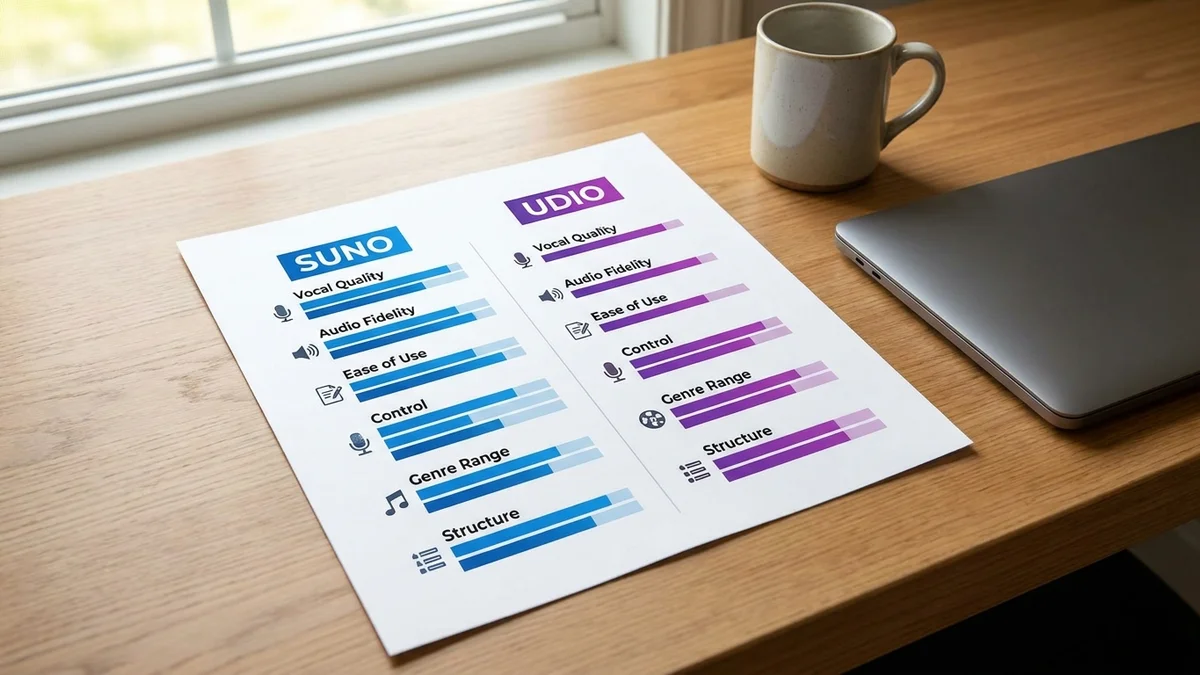
Suno vs Udio: Feature Comparison at a Glance
Feature
Suno
Udio
Our Rating
8.5/10
8.2/10
Best For
Full songs with vocals
High-fidelity instrumentals
Free Tier
Yes (limited daily credits)
Yes (limited daily credits)
Max Song Length
Up to 8 minutes
Shorter clips, extendable to ~15 minutes
Vocal Quality
Excellent
Good
Audio Fidelity
Good
Excellent
Custom Lyrics
Yes
Yes
Genre Range
Broad, pop-leaning
Broad, stronger in niche genres
Ease of Use
Very easy
Moderate
Commercial Rights
Paid plans only
Paid plans only
Both platforms approach AI music generation from different angles. Suno optimizes for accessibility and complete songs. Udio optimizes for audio quality and creative control. That fundamental difference ripples through every feature comparison below.
Sound Quality and Audio Fidelity
This is where Suno vs Udio diverges most dramatically.
Suno produces tracks that sound complete and radio-ready out of the box. The mix is balanced, vocals sit properly on top of the instrumentation, and the overall output has a polished quality that makes songs immediately usable for content, social media, or casual listening. But listen closely with decent studio headphones, and you'll notice the audio can feel somewhat compressed. There's a slight artificial sheen in the high-frequency range where cymbals and vocal sibilance live.
Udio takes a different path entirely. Based on community feedback across music production forums and YouTube comparison videos, Udio's output consistently scores higher on raw audio fidelity. The separation between instruments is cleaner, the dynamic range is wider, and the stereo image feels more natural and spacious. For producers and musicians who obsess over these details, the gap is significant.
But sound quality alone doesn't determine which tool is right for you. Suno's more processed sound actually works in its favor for pop, EDM, and hip-hop, where that polished, slightly compressed aesthetic is baked into the genre identity. Nobody complains that a pop song sounds too produced.
For reference tracks, demo recordings, or anything where raw audio quality matters most, Udio has a genuine advantage. For everything else, Suno's sound is more than good enough.
Vocal Generation
Suno wins this category. And it's not particularly close.
The vocal quality on Suno is genuinely impressive for AI-generated music. It handles male and female voices across styles ranging from breathy indie folk to aggressive rap delivery to soaring pop belts. Lyrics come through mostly intelligible (still a genuine achievement for AI singing), and the vocal performances include enough emotional variation to feel convincingly human. You get vibrato where it makes sense, breath sounds in quiet passages, and dynamic shifts that match the energy of the song.
Udio's vocals are serviceable but noticeably a step behind. They tend toward a more synthetic quality, and enunciation gets muddy on complex lyrical passages or rapid-fire syllables. Udio shines when vocals play a supporting role rather than carrying the track, or when you're generating purely instrumental music where vocals aren't a factor.
Suno also handles vocal harmonies and backing vocals more convincingly. If you prompt for a choir section or layered harmonies, Suno produces results that sound arranged rather than randomly stacked.
If your primary goal is creating vocal-driven songs, Suno is the obvious pick. This single advantage is the biggest reason it earns the higher overall rating.
Suno's vocal quality is the single biggest differentiator in the Suno vs Udio matchup.
Customization and Creative Control
Udio claws back ground in this category.
Udio gives users more granular control over the generation process. You can influence style, mood, tempo, and structure with greater precision, and the platform responds to detailed prompts more faithfully. The inpainting feature lets you regenerate specific sections of a track while keeping the rest intact. For musicians who want to iterate toward a particular sonic vision, this level of control matters a lot.
Suno keeps things deliberately simple. Type a description, paste in optional lyrics, select a style tag, and hit generate. The results are usually solid, but you have less ability to push the output in a specific direction. You can extend and remix songs, but the core creative loop is designed for speed rather than precision.
Think of it as the difference between a point-and-shoot camera and one with full manual controls. The automatic mode produces great photos for most people. But photographers who know what they want need that manual mode.
For content creators and casual users, Suno's simplicity is an advantage, not a limitation. For working musicians and producers who want to shape their output, Udio's extra controls justify the steeper learning curve.
Output Length and Song Structure
Suno holds a clear edge for generating longer, structurally coherent songs. It can produce tracks up to eight minutes in a single generation (on current models), with identifiable verses, choruses, bridges, and outros that flow naturally. The song structure makes musical sense, an achievement that's easy to take for granted but genuinely difficult for AI to pull off consistently.
Udio initially launched with shorter output limits and has expanded over time through features like track extension and section regeneration. You can piece together longer compositions, but the workflow requires more manual intervention than Suno's more automated approach.
For shorter clips, jingles, background loops, or social media audio, both platforms deliver strong results without much effort. But for anything resembling a full-length song with traditional verse-chorus architecture, Suno's structural understanding gives it a meaningful advantage.
Genre Range and Versatility
Interesting wrinkle in the Suno vs Udio genre comparison: both handle mainstream genres well. Pop, rock, hip-hop, electronic, country, and R&B all produce consistently good output on either platform. You can generate a decent pop ballad or trap beat on both without much prompt engineering.
The differences emerge with niche and technically demanding genres. Udio handles jazz, classical, ambient, and world music with noticeably more authenticity. The instrumental detail in these genres benefits from Udio's superior audio separation and dynamic range. A jazz trio generated on Udio sounds like instruments breathing together in a room. On Suno, the same prompt might sound more like a well-produced but slightly sterile arrangement.
Suno, conversely, tends to produce better results in genres where production polish is the point. Synth-heavy electronic music, modern pop, and lo-fi hip-hop all play to Suno's strengths.
So if you're making pop songs or lo-fi study beats, grab either one. But if you want a convincing bossa nova track or a solo piano piece with real dynamic range, Udio gets you closer to the real thing.
Pricing: How Do the Plans Stack Up?
Both platforms offer free tiers, which is the right place to start before spending any money.
Tier
Suno
Udio
Free
Limited daily credits
Limited daily credits
Mid Tier
~$10/month
~$10/month
Top Tier
~$30/month
~$30/month
Commercial Use
Paid plans only
Paid plans only
Pricing structures are roughly comparable between the two platforms. Both restrict commercial usage rights to paid subscribers, so if you plan to use AI-generated music in YouTube videos, podcasts, advertisements, or other monetized content, you'll need a subscription on whichever platform you choose.
One important caveat: credit allocations, generation limits, and exact pricing change frequently on both platforms. Check suno.com and udio.com for current plan details before committing to a subscription. The numbers above reflect approximate pricing as of early 2026.
At similar price points, the decision comes down to which platform's strengths match your needs, not which one offers a better deal per dollar.
Community and Ecosystem
Suno has built a larger, more active user community. Its Discord server is active with shared creations, prompt tips, genre experiments, and feedback threads. The platform also features a public library of user-generated songs (essentially a social feed of AI music), which is useful for discovering what's possible and reverse-engineering effective prompts.
Udio's community is smaller but skews toward serious musicians and audio producers. The Udio blog regularly covers new features and technical deep-dives. Discussions tend to be more technical, focusing on audio fidelity comparisons, production workflow integration, and creative techniques for getting the most out of the platform's controls.
For beginners, Suno's community offers more accessible resources and inspiration. For experienced musicians looking for deeper technical conversation, Udio's community punches above its weight.
When to Choose Suno
You want complete songs with strong, believable vocals
Speed and simplicity matter more than fine-tuning every detail
Pop, rock, hip-hop, or EDM are your target genres
You're a content creator who needs usable music fast
You want a large community for prompt ideas and inspiration
You need full-length songs with coherent structure
When to Choose Udio
Audio fidelity is your top priority
You want granular creative control over the output
Instrumental, classical, or jazz music is your focus
You're a musician looking for a production or ideation tool
You work with niche genres that demand authentic instrumental detail
You're comfortable with a less guided, more hands-on workflow
The Final Verdict
Suno is the better AI music generator for most people. Its vocal quality is clearly superior, its interface removes friction from the creative process, and its ability to produce complete, well-structured songs makes it the most practical choice for content creators, hobbyists, and anyone who wants to go from idea to finished track with minimal effort. It earns its 8.5/10 rating.
Udio is the better choice for audio purists and working musicians. If you care about the fidelity of each instrument, want more control over your generations, and don't mind investing extra effort to shape the output, Udio produces results that sit closer to professional production quality. Its 8.2/10 rating reflects a tool that's slightly less accessible but deeper in capability.
For content creators, Suno wins. For audio purists, Udio wins. There's no wrong choice — just different priorities.
Neither platform is perfect. Both still produce occasional artifacts, odd harmonic choices, and musical moments that no human would create. But they represent the two strongest options available for AI music generation, and the quality of both platforms continues to improve with each update.
The good news? Both offer free tiers. Try each with the same prompt and decide for yourself which output resonates more. Your ears are the best judge.
Can I use Suno or Udio music commercially on YouTube?
Both platforms restrict commercial usage to paid subscribers. Free-tier generations are for personal, non-commercial use only. If you subscribe to a paid plan on either Suno or Udio, you receive a license to use generated tracks in monetized YouTube videos, podcasts, and similar content. Always review the specific terms on each platform, as licensing details can differ between tiers.
Can I upload my own vocals or instruments to Suno or Udio?
Udio supports audio uploads and inpainting, letting you feed in reference audio and modify specific sections. Suno also supports audio uploads (up to 8 minutes for paid users, 60 seconds on the free tier) and recently added a Voices feature for custom voice cloning. Both platforms now allow blending your own recordings with AI-generated music, though Udio's inpainting feature still offers more granular editing control over specific sections.
Do Suno and Udio songs get flagged by copyright detection on YouTube?
Songs generated on paid plans are original compositions, so they shouldn't trigger Content ID matches on YouTube. However, if your prompt closely mimics a specific artist's style, the output could sound similar enough to raise flags. Both platforms recommend avoiding prompts that name specific copyrighted artists. Neither platform guarantees indemnification against copyright claims.
Is there an API for Suno or Udio to automate music generation?
As of early 2026, neither platform offers a fully public, documented API for third-party developers. Both have shown limited API access or beta programs at various points. If you need programmatic access for building apps or automating music generation at scale, check each platform's developer documentation for the latest availability.
Can Suno or Udio generate realistic instrument solos like guitar or saxophone?
Udio generally handles realistic instrument solos better due to its higher audio fidelity and instrument separation. Guitar solos, saxophone passages, and piano runs sound more natural and dynamically varied on Udio. Suno can produce these elements, but solos tend to sound more generic and lack the tonal nuance that makes them convincing. For instrumental showcases, Udio is the stronger choice.