Runway Gen-3 Rated 8.2/10: The Honest Verdict | AI Bytes
0% read
Runway Gen-3 Rated 8.2/10: The Honest Verdict
Reviews
Runway Gen-3 Rated 8.2/10: The Honest Verdict
Runway Gen-3 Alpha earns 8.2/10 in our honest review. Strong creative controls and cinematic output, but Kling AI and Google Veo now score higher. Here's who should still pick it — and who shouldn't.
March 30, 2026
11 min read
598 views
Updated March 31, 2026
The AI video space has gotten crowded. Really crowded. With Sora, Kling AI, Google Veo, Pika, and a half-dozen other tools all fighting for creator dollars, picking the right AI video generator feels like choosing a streaming service — except you're paying for content you haven't made yet.
So where does Runway Gen-3 Alpha land in all of this? Is it still the default choice for creators, or have newer competitors stolen the crown? After analyzing creator feedback, published samples, community discussions, and official documentation, here's an honest Runway Gen-3 review that doesn't pull punches.
Quick Verdict
Rating
8.2 / 10
One-Line Verdict
Excellent creative controls and solid output quality, but competitors are gaining ground fast
Best For
YouTubers, filmmakers, marketers, and social media creators who want polished AI video with precise creative control
Free Tier
Yes (limited credits)
What Is Runway Gen-3 Alpha?
Runway is an AI creative tools company that's been in the video generation space longer than most of its competitors. Gen-3 Alpha is their well-known video generation model, capable of creating clips from text prompts, still images, or a combination of both. Think of it as a director you can hire for pennies — one that never sleeps, never argues about shot composition, and (mostly) follows your creative vision.
The model generates clips up to 10 seconds with consistent motion, decent physics understanding, and a cinematic quality that makes the output readily usable in professional workflows. Runway first launched Gen-3 Alpha in mid-2024, and as of March 30, 2026, the model remains available alongside newer offerings — Runway has since released Gen-4 (March 2025) and Gen-4.5 (December 2025), which are now the company's flagship models. Gen-3 Alpha is accessible in the Legacy tab and still used by creators who prefer its specific workflow.
What separates Runway from pure research demos is that it's a production tool. You sign up, type a prompt, and get video. No waitlists, no API wrangling, no research previews. That maturity matters when you have deadlines.
Is Runway Gen-3 the Best AI Video Generator?
Runway Gen-3 Alpha is one of the best AI video generators you can use right now, scoring 8.2/10 in our AI tools database. But honest truth: it's not the top-rated option. Kling AI (8.5/10) and Google Veo (8.6/10) both score higher as of March 2026. The best pick depends on what you actually need — Runway wins on creative control and ecosystem depth, while competitors may produce better raw output.
This Runway Gen-3 review isn't going to pretend the competition doesn't exist. It absolutely does. But rating points don't tell the whole story.
Runway isn't the cheapest or the highest-rated AI video tool anymore. But it might still be the most practical one for working creators.
7 Key Features That Set Runway Gen-3 Apart
Text-to-Video Generation
The core feature. Type a prompt, get a video clip. Gen-3 Alpha handles this admirably — motion is fluid, subjects hold consistency across frames, and the overall aesthetic skews cinematic rather than synthetic. You'll get the strongest results with detailed, specific prompts that describe scene composition, lighting, and camera angle. Vague descriptions produce vague results (which is true of every AI video tool, honestly).
The quality gap between Gen-3 Alpha and earlier models like Gen-2 was massive. The gap between Gen-3 Alpha and its current competitors? Much smaller. That's both a compliment and a warning.
Image-to-Video Conversion
This is where Runway really shines. Upload a still image and Gen-3 Alpha animates it with impressive fidelity. The model respects the source image's composition, lighting, and style better than most alternatives. For creators who already have an established visual identity — photographers, illustrators, brand designers — this feature is gold.
The practical application here is huge. Got a product photo? Animate it into a 5-second social media ad. Have a piece of concept art? Bring it to life for a pitch deck. The barrier between still and motion has never been thinner.
Motion Brush
The Motion Brush lets you paint motion onto specific regions of your frame. Want clouds drifting left while a character stays perfectly still? You can do that. Need water flowing in one direction while the camera holds steady? Done.
It's an imprecise tool — don't expect pixel-perfect control — but it gives you a level of creative direction that most text-to-video tools simply can't match. And for creators who've been frustrated by the "AI decides everything" approach of other tools, Motion Brush feels like getting some of your agency back.
Camera Movement Presets
Pan, tilt, zoom, orbit, dolly. Runway gives you preset camera movements you can apply to any generation. Camera movement is the difference between "AI clip" and "cinematic shot." Having direct control over it dramatically improves output quality and makes your results look intentional rather than random.
Style References
You can feed Gen-3 Alpha reference images to guide the aesthetic of your output. Trying to match a specific color grade, film stock look, or visual mood? Style references get you closer than prompt engineering alone.
But results can be inconsistent. Sometimes the model latches onto the wrong elements of your reference — copying subject matter instead of style, or interpreting color palette too literally. It works about 70% of the time, which is both impressive and frustrating.
Lip Sync
Runway added lip sync capabilities that match generated video to audio tracks. Quality is decent for short clips — think social media content or quick character dialogue — but falls apart with longer sequences or complex speech patterns. It's a useful supplementary feature, not a primary workflow.
Multi-Resolution Output
Gen-3 Alpha supports widescreen 16:9, vertical 9:16 (for Reels and TikTok), and square 1:1 output. This flexibility saves real time when you're creating content for multiple platforms from a single prompt. Small feature, big time savings.
Real-World Performance: What Creators Report
Based on published samples and community feedback, Gen-3 Alpha performs best in three specific scenarios:
Cinematic b-roll. Sweeping wide shots, atmospheric establishing scenes, mood-setting clips. This is Gen-3 Alpha's sweet spot. The model produces footage that can genuinely pass for stock video — and sometimes looks better than what you'd find on stock sites. Multiple YouTube creators have documented using Runway b-roll in published videos without viewers noticing.
Product visualization. Showing a product in a lifestyle context without booking a photographer or renting a studio. Results aren't flawless, but for early-stage marketing materials, social media ads, or pitch decks, they're more than adequate. The image-to-video pipeline is particularly strong here.
Concept videos and pre-visualization. Directors and creative leads use Gen-3 Alpha to pre-visualize scenes before committing to expensive production. It's like rapid prototyping for visual storytelling — cheaper than storyboard artists, faster than animatics, and more communicative than mood boards.
Where does it struggle? Human faces and hands remain problematic (though significantly less so than a year ago). Fast action sequences often produce motion artifacts and frame inconsistencies. And if your prompt requires precise spatial relationships between multiple subjects — say, two people shaking hands at a table — expect some creative interpretation from the model.
The sweet spot for Runway Gen-3 is cinematic b-roll and concept work. Don't ask it to replace your production crew — ask it to augment your pre-production workflow.
Runway Gen-3 vs the Competition
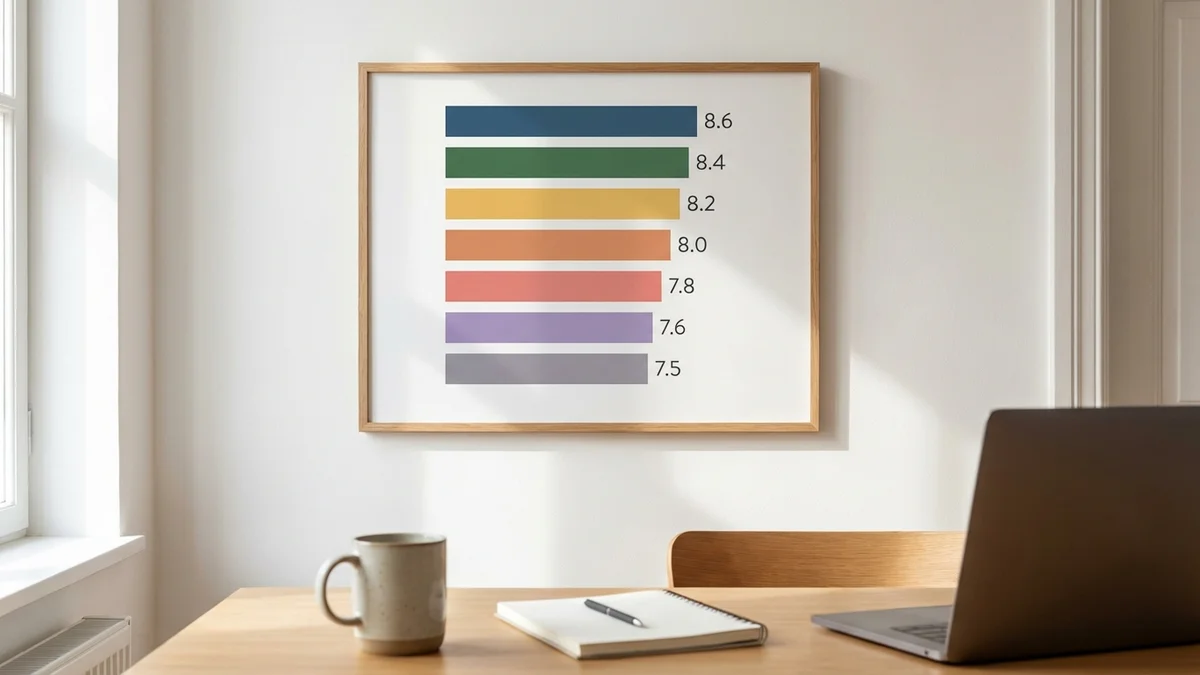
Here's how Runway stacks up against the major AI video generators, based on our ratings as of March 30, 2026:
Tool
Rating
Free Tier
Best Strength
Google Veo
8.6/10
Yes (limited)
Raw video quality and physics
Kling AI
8.5/10
Yes
Motion consistency and longer clips
Runway Gen-3
8.2/10
Yes
Creative controls and workflow
Hailuo AI
8.0/10
Yes
Quality-to-cost ratio
Pika
7.8/10
Yes
Ease of use and editing features
Sora
7.5/10
No
Physics understanding (shutting down April 2026)
Luma Dream Machine
7.5/10
Yes
Realistic motion
A few things jump out from this table. Google Veo leads the pack and offers limited free access through Google's daily AI credits, though full Veo 3.1 features require a paid Google AI Pro subscription. Kling AI actually outscores Runway and offers free access — that's a pretty compelling value proposition. And Pika, while lower-rated overall, has carved out a niche with its editing-first approach that some creators prefer.
Important update: OpenAI announced on March 24, 2026 that Sora is shutting down, with the app ending April 26. The tool reportedly burned through $1 million per day in compute costs while generating just $2.1 million in total revenue. If you were considering Sora, redirect that evaluation toward Kling AI or Google Veo instead.
So why pick Runway over higher-rated alternatives? Three reasons: creative control (Motion Brush, camera presets, style references), ecosystem maturity (Runway has been building AI creative tools since 2018), and workflow reliability. If you're a professional creator who needs predictable, controllable output rather than the occasional stunning but unpredictable generation, Runway's toolset is still hard to beat.
But if raw output quality is your only metric, Google Veo and Kling AI deserve serious consideration.
Pricing: Is Runway Gen-3 Worth the Cost?
Runway operates on a credit-based pricing system with tiered subscriptions. As of March 30, 2026, the general structure includes:
Free tier — Limited monthly credits to test the platform
Standard — Entry-level paid plan ($12/month billed annually) with more credits and faster generation
Pro — Mid-tier plan ($28/month billed annually) for regular creators
Unlimited — High-volume plan ($76/month billed annually) with priority processing and Explore Mode
Enterprise — Custom pricing for teams and organizations
Specific dollar amounts change frequently, so check runwayml.com for current rates rather than relying on outdated numbers.
About AI video pricing that nobody talks about enough: the cost isn't just the subscription fee. It's the iteration cost. If you need 5 generations to get one usable clip, your real per-clip cost is 5x what you'd calculate from the pricing page alone. Runway's relatively strong prompt adherence means you'll typically burn fewer credits per usable output than with cheaper alternatives, which partially offsets the higher sticker price.
That said, if you're producing high volumes of content, those credits drain fast. Heavy users should seriously evaluate whether the Pro tier makes financial sense versus alternatives with more generous free tiers.
Your real cost with any AI video tool isn't the subscription — it's how many generations you burn before getting something usable.
Pros and Cons
What Runway Gen-3 Does Well:
Best-in-class creative controls with Motion Brush and camera presets
Strong image-to-video quality that preserves source aesthetics
Mature, stable platform with regular updates and a proven track record
Multiple output resolutions for cross-platform content creation
Professional-grade interface with minimal learning curve
Active creator community with shared prompts and techniques
Where It Falls Short:
Human faces and hands still produce noticeable artifacts
10-second clip limit requires stitching for longer sequences
Credit-based pricing gets expensive for high-volume users
Style reference results are hit-or-miss
Multiple competitors now match or exceed Gen-3's raw output quality — see our Sora safety analysis for more on OpenAI's approach
Who Should Use Runway Gen-3?
YouTubers and content creators who need supplementary b-roll, transitions, or concept visuals. If you're producing regular content and need quick, polished clips without hiring a videographer, Runway fits naturally into the workflow.
Marketing teams creating social media ads, product teasers, or brand content. The multi-resolution output and style reference features make it practical for teams managing content across multiple platforms.
Filmmakers and directors in pre-production. Gen-3 Alpha for concept visualization and pre-vis work saves time and communicates creative intent far better than static storyboards.
Designers and artists who want to extend still work into motion. The image-to-video pipeline is genuinely impressive for this use case.
Who Should Skip It?
Budget-conscious creators needing high volume. The credit system adds up fast, and alternatives like Kling AI or Hailuo AI offer competitive quality with more generous free access.
Anyone needing clips longer than 10 seconds. You can stitch clips together, but the seams frequently show. If long-form AI video is your core requirement, look at competitors supporting extended generation lengths.
Creators who need photorealistic human subjects. Every AI video tool struggles with humans to some degree, but if lifelike people are your primary use case, you'll spend more time regenerating than creating — regardless of which platform you choose.
Final Verdict: 8.2/10
Runway Gen-3 Alpha is a genuinely strong AI video tool. Not the highest-rated in the category (that title goes to Google Veo at 8.6/10), but arguably the most well-rounded option for professional creative work. The gap between Runway and its competitors has narrowed significantly — this isn't 2024 anymore, when Runway was the obvious default choice.
What keeps Runway relevant is its creative toolset. Motion Brush, camera controls, style references, and a platform refined through years of real creator feedback. These features matter because they give you control over the output, and control is what separates a toy from a tool.
Should you use it? If you value creative direction and workflow integration over chasing the absolute best raw output, yes. If you're purely optimizing for visual quality at the lowest cost, shop around.
And honestly? The smartest move is to test Runway's free tier alongside Kling AI's free tier, compare results on your actual use case, and commit from there. Our Runway Gen-3 review comes down to this: it's a very good tool in a category that's gotten very competitive. That's not a bad place to be — it just means you have options.
Runway Gen-3 Alpha is a genuinely strong AI video tool rated 8.2/10 — not the highest in its category, but arguably the most well-rounded for professional creative workflows. Its creative control features (Motion Brush, camera presets, style references) set it apart even as competitors close the quality gap. Best for creators who value directorial control over raw output quality.
Pros
+ Best-in-class creative controls with Motion Brush and camera presets
+ Strong image-to-video fidelity that preserves source aesthetics
+ Mature platform with years of iterative improvements
+ Multi-resolution output for cross-platform content
+ Professional UI with minimal learning curve
+ Active creator community sharing prompts and techniques
Cons
- Human faces and hands still produce artifacts frequently
- 10-second clip limit requires stitching for longer content
- Credit-based pricing gets expensive at high volume
- Style reference results are inconsistent
- Competitors like Kling AI and Google Veo now match or exceed raw output quality
Frequently Asked Questions
Can I use Runway Gen-3 videos for commercial projects?
Yes, Runway's paid subscription plans include commercial usage rights for generated video content. The free tier may have restrictions on commercial use. Always check Runway's current terms of service at runwayml.com for the most up-to-date licensing details before using AI-generated clips in commercial work.
Does Runway Gen-3 have an API for developers?
Runway offers API access for programmatic video generation, allowing developers to integrate Gen-3 Alpha into custom workflows and applications. API pricing is typically separate from consumer subscription plans and billed per generation or per second of output. Check Runway's developer documentation for current endpoints, rate limits, and pricing.
Can Runway Gen-3 generate videos longer than 10 seconds?
Gen-3 Alpha generates individual clips up to 10 seconds per generation. For longer sequences, you can use Runway's extend feature to chain multiple clips together. However, maintaining perfect visual consistency between chained segments can be challenging — expect some variation in lighting, color, and subject appearance at transition points.
How does Runway Gen-3 compare to Kling AI for video quality?
Kling AI rates slightly higher overall (8.5/10 vs Runway's 8.2/10) and supports longer clip generation with strong motion consistency. Runway counters with superior creative controls like Motion Brush and camera presets that give you more directorial input. For pure output quality, Kling edges ahead; for creative direction and workflow control, Runway wins.
What computer specs do I need to use Runway Gen-3?
Runway Gen-3 Alpha runs entirely in the cloud through your web browser, so you don't need a powerful local GPU or specific hardware. Any modern computer with a stable internet connection and an up-to-date browser (Chrome, Firefox, Safari, Edge) will work. Processing happens on Runway's servers, making it accessible even from lower-end laptops or Chromebooks.